Madhukar Planet: App reviews
Showing posts with label App reviews. Show all posts

Friday, October 7, 2022

Friday, September 23, 2022

How Amazon great Indian festival and flipkart big billion day sale works


This brilliant scene from a kannada film shows how the Amazon or flipkart sale offers work! Though there are cases where you will find some product prizes would have genuinely gone down you will also need to realise that they the discounts apply mostly for older models of phones tv or gadgets. 

So do your due diligence before you buy stuff online during sale times like the Amazon great Indian festival and flipkart big billion day sale.

There are apps and websites or chrome extensions that help you take a look at the historical graph of the price of a certain product on sale. You can notice that certain products have the same prize even during regular days. They only benefit that you might get is the additional bank discount offered on Amazon and flipkart.

https://twitter.com/memesmaadonu/status/1572846472684802048?s=46&t=bmJ7jNdecygKjN7BFRigGw

I shall update this article with some great deals that you can get during the sale time ! Happy shopping 🛍️😆

Samsung 138 cm (55 inches) Crystal 4K Series Ultra HD Smart LED TV UA55AUE60AKLXL (Black)

M.R.P.:₹69,900.00 
Deal of the Day:₹44,980.00  
Ends in 4 days
You Save: ₹24,920.00 (36%) 
  • EMI from ₹1,874. No Cost EMI available.

  • https://amzn.to/3S8D00x

    Shoes

    Woodland Men's OGC 3737120 Leather Sneaker

    https://amzn.to/3Ss6TZr

    Apple iPhone 12 at 25% discount

    25%  ₹52,999
    M.R.P.:  Rs 70,900 

    Wednesday, July 27, 2022

    Gaalipata 2 song reaction video - New video sharing platform!


    ನಮಸ್ಕಾರ ಮಿತ್ರರೆ... ಇತ್ತೀಚಿನ ದಿನಗಳಲ್ಲಿ ಒಳ್ಳೆ ಮೆಲೋಡಿಯಸ್ ಹಾಡುಗಳ ಬರ ಬಂದಿತ್ತು. ಈ ಸಮಸ್ಯೆಯನ್ನು ನೀಗಿಸಲು ಜಯಂತ್ ಕಾಯ್ಕಿಣಿ, ಅರ್ಜುನ್ ಜನ್ಯ ಮತ್ತು ಯೋಗರಾಜ್ ಭಟ್ ರವರು ನಿಮ್ಮ ಮುಂದೆ ಗಾಳಿಪಟ - ೨ ಚಿತ್ರದ ಹಾಡುಗಳನ್ನು ನಿಮ್ಮ ಮುಂದೆ ತಂದಿದ್ದಾರೆ. ಈ ಚಿತ್ರದ ಒಂದು ರಿಯಾಕ್ಷನ್ ವಿಡಿಯೊ ವನ್ನು ನೋಡಿ ಆನಂದಿಸಿ.

    Wednesday, June 16, 2021

    what is swift playgrounds? -By Neha

     hey guys it's me Neha and today I'm gonna be telling you guys about something called swift playgrounds 

    Swift Playgrounds is an educational tool and development environment for the Swift programming language developed by Apple Inc, initially announced at the WWDC 2016 conference. It was introduced as an iPad application alongside iOS 10, with a macOS version introduced in February 2020. 


    In addition to publishing the Swift Playgrounds application itself, Apple also produces a series of educational lessons teaching programming and debugging skills. The application can also subscribe to lessons and other content published by third parties, including lessons allowing users to control educational toys such as Lego Mindstorms EV3 and Sphero robots. Apple publishes a curriculum guide for educators wishing to incorporate Swift Playgrounds into their teaching


    Swift Playgrounds was designed to be a development environment and an education tool simultaneously.[8] The app allows users to download lessons and challenges. Once stored on the iPad, these can be copied and modified without the need for an active internet connection.


    Apple's initial lessons, available for all Swift Playgrounds users to download, introduce three characters: Byte, Blu, and Hopper. In each challenge, young coders are asked to assist these characters achieving simple goals by coding simple instructions. As challenges become more difficult, more complex algorithms are required to solve them and new concepts are introduced.[9] Advanced lessons in Playgrounds introduce users to more complex features such as Apple's Bluetooth and Augmented Reality development platform (ARKit) APIs.[10]


    In addition to Apple's own educational content, Swift Playgrounds can download third-party lessons through its subscriptions feature.[5][4] Some third-party lessons allow the app to control robots (such as Lego Mindstorms EV3 and Sphero educational toys) and drones (such as the Parrot).[6] Apple also offers coding classes using Swift Playgrounds at Apple Stores.[11]


    Swift Playgrounds was designed to be fully accessible to users with disabilities. It supports Apple's VoiceOver screen reader technology, and at WWDC 2020 Apple introduced a series of lessons called "Swan's Quest" which use accessibility features to help students solve puzzles. 

    The Swift Playgrounds application was announced on June 13, 2016, at WWDC 2016 as an iPad exclusive app to help people learning to code with Apple's Swift programming language. A beta version for Apple developers was released on the same date, followed by a public beta version in the following month. The app was presented as a teaching tool for students, introducing the core concepts of coding using an interactive environment designed for touch. The application's name is an apparent reference to Xcode's earlier Playgrounds feature, introduced in 2014.


    Along with iOS 10, the app was officially released on September 13, 2016. Apple also published a curriculum guide, recommending the iPad app for middle school students and up. In January 2018, Apple introduced subscriptions to the iPad application, allowing users to subscribe to playgrounds developed by third parties.


    On February 11, 2020, Apple released a macOS version of Swift Playgrounds on the Mac App Store, built using Apple's Catalyst technology. Subsequent versions of the application have supported both iPadOS and macOS, with most of Apple's curriculum available on both platforms. For WWDC 2020, Apple published a session instructing third-party developers on how to support both platforms in their subscriptions.


    when I heard about this for the first time, I basically thought it was maybe merch by Taylor swift 😂😂😂

    not gonna lie, but I have never heard of this software until now, I was just scrolling through my blog ideas list, (which is a list I made on my phone using the notes app)  and suddenly this appeared, 

    I do not remember adding this into the list at all, and I googled it and it turned out to be pretty interesting so I thought why not write a blog about it! and that's how we're here now 


    anyway, that's it for this blog, I hope you guys enjoyed it! oh and I'm going to be resuming my blog series! so stay tuned for that! 

    what is ott? (over the top) media service -By Neha

     hey guys it's Neha and I know I haven't posted a blog for a few days, no reason for that, I've just been super busy with school and my novel, and I haven't even been able to post any videos, but that's happening soon, so stay tuned! 

    today I'm going to be talking about ott which is over the top media service 

    n over-the-top (OTT) media service is a media service offered directly to viewers via the Internet. OTT bypasses cable, broadcast, and satellite television platforms, the types of companies that traditionally act as controllers or distributors of such content.[1] It has also been used to describe no-carrier cellphones, where all communications are charged as data,[2] avoiding monopolistic competition, or apps for phones that transmit data in this manner, including both those that replace other call methods[3][4] and those that update software.[4][5]


    The term is most synonymous with subscription-based video-on-demand (SVoD) services that offer access to film and television content (including existing series acquired from other producers, as well as original content produced specifically for the service).[citation needed]


    OTT also encompasses a wave of "skinny" television services that offer access to live streams of linear specialty channels, similar to a traditional satellite or cable TV provider, but streamed over the public Internet, rather than a closed, private network with proprietary equipment such as set-top boxes.[citation needed]


    Over-the-top services are typically accessed via websites on personal computers and via apps on mobile devices (such as smartphones and tablets), digital media players (including video game consoles), or televisions with integrated Smart TV platforms.[citation needed]


    In 2011, the Canadian Radio-Television and Telecommunications Commission (CRTC), Canada's telecom regulator, stated that it "considers that Internet access to programming independent of a facility or network dedicated to its delivery (via, for example, cable or satellite) is the defining feature of what have been termed 'over-the-top' services".[6]


    In contrast to video on demand video-delivery systems offered by cable and IPTV, which are tightly managed networks where channels can be changed instantly, some OTT services such as iTunes require that the video be downloaded first and then played,[7] while other OTT players such as Netflix, Hulu, Disney+ and Amazon Prime Video, offer movie downloads that start playing before the download completes (streaming).[8]


    The United States Federal Communications Commission (FCC) categorizes the OTT services into two groups: multichannel video programming distributors (MVPDs); and online video distributors (OVDs).[9][10]


    Virtual MVPDs include such varied services as AT&T TV, FuboTV, Sling TV, Hulu + Live TV, and YouTube TV.


    An OVD was defined by the FCC as:[9]

    any entity that provides video programming by means of the Internet or other Internet Protocol (IP)-based transmission path where the transmission path is provided by a person other than the OVD. An OVD does not include an MVPD inside its MVPD footprint or an MVPD to the extent it is offering online video programming as a component of an MVPD subscription to customers whose homes are inside its MVPD footprint.


    a few examples of ott is: 

    Netflix, amazon prime, Hulu, Hotstar, zee 5, sun nxt, skype, WhatsApp, signal, messages, apple tv and so much more 

    Because of the pandemic all the theatres are shut, these are the very good means to watch new releases such as series and movies, where they can watch right from their living room 

    And for web series, it’s even better we can binge the entire season (not that you should, but you can) 

    For example. Me and my family binge watched family man season 2 and after finishing season 2, it reminded me how amazing the first season was and wanted to watch it again, and I watched the 1st season as well (not all at once, don’t worry) 

    Speaking of that’s also another amazing thing about ott. We can watch any of the seasons on repeat! But when these tv series are on tv channels, we’d have to wait for another week or another day (another day doesn’t seem so bad, but If the show’s freakin’ amazing like friends, well then you definitely won’t be able to wait) although even on some ott platforms such as Hotstar and prime sometimes we’d have to wait for a week for another episode to air, like mare of east town for example, 

    And can theatres co- exist after these ott platforms in the future? 

    It is an interesting topic to think about 

    anyway, that's it for this blog, comment down below and let me know what you guys think about it! 


    Tuesday, May 18, 2021

    learn from skillshare! By Neha

     hey guys it's me Neha and today I'm going to be talking about skillshare, Skillshare is an online learning community where you guys can educational stuff like you can learn how to use procreate, I'm pretty sure you guys have heard of it since a lot of people are getting sponsored by them on youtube videos, I've been taking a few courses myself and I'm not gonna reveal what the courses are just yet you guys are gonna have to wait until May 20th for that blog!  I'm gonna release it tomorrow at 12am. skillshare is of course not accredited but is Available through subscription, its definitely worth it since there are SO many videos out there on every possible topic, like book publishing, learning grammar, and learning to illustrate on procreating and writing and everything


    so you guys can check it out if you want, it's available on ios, I'm not sure if it's available on android,  but I'm pretty sure it is any way that's it for this blog, and also stay tuned for the surprise! I hope you guys liked it, see you at the next one, ciao! 

    Monday, May 3, 2021

    How to use Canva! YouTube 101! -By Neha

     Hey guys it’s me Neha and today I’m gonna be talking and teaching you guys about Canva. So Canva is an app used for creating posters and other designs. Even for thumbnails of your YouTube videos. When i first started my YouTube channel I didn’t really know what to do,  i was completely lost. I know what you guys may be thinking. “Isn’t your dad a YouTuber?” Yes he is but my dad didn’t teach me anything he didn’t even teach me how to edit and i struggled a lot and i actually got it on the second try. And the reason my dad didn’t teach me is because he wanted me to learn it by myself and I’m glad he did so. 

    Anyway i knew only how to edit and use iMovie and i only knew how to use the transitions that were on iMovie I didn’t know that you could do so many other things and the options are endless!. My dad also didn’t know how to use Canva and i was the one who thought him. And this is proved because when you watch my dad’s older videos and compare them with the newer ones for example watch the titanic projector video and watch the first actual projector video and that video hit like 30 thousand views so congrats dad!  Anyway you’ll see that the newer video’s thumbnail is a lot better! 

    You guys can use Canva for adding texts and little edits into your video as well. There are so many options in this app.. how i learned about this app was that i used to watch a lot of how to edit on iMovie videos on YouTube and it definitely helped me! You guys could do it too if you want!. But you can totally use iMovie as Final Cut Pro, its almost the same, and the texts in Canva are amazing you can choose different fonts and colours and so many other things you can even add effects on the texts you can make them neon and so much more! 


    And the screenshots above are the ways that you can use Canva 
    And you can also use this to make presentations and posters and invitations 
    And also egreetings! I’m pretty sure this is not the exact egreeting but well its something close to my heart on my dad’s birthday! 

    And if you guys are using Canva for texts in your YouTube video or even for the thumbnail you guys have to select the dimensions for 1280 and 720. This is the measurement of the YouTube video that you have to add text on your video that your working on! 
    And guys don’t worry if you're really understanding i will make a YouTube series called YouTube 101 and its also on my blog! 

    Anyway if you guys want to use text on your video. Unless you have Canva pro you will not get a transparent background and what this means is that. When you wanna add texts to your video you want the background to be transparent. And Canva will not allow it if you have a free account. If you don’t have a transparent background on yout text you will not be able to add it in your video because there will be a white background with it and we don’t want that. So what i usually do for this is that i go to the website called lunapic.     What Lunapic does is that it will add a transparent background to your text
    And if you guys don’t wanna use this there’s another website called background remover. Where it will basically do the same thing so it really doesn’t matter what you choose 

    And when you go to the website you’re gonna click on transparent and you can upload your picture there and also guys make sure you click on transparent colour and not on transparent area because the white background will still be there in some of the letters. And after you’ve done that you’re gonna click on save  image as png or save image and then you’re done its gonna be saved in your camera roll or in your files if you’re  using a computer but you get the point it’ll be saved and you guys can add it into your video in iMovie! 

    And that’s it for this blog i hope you guys liked it no also do stick around for the YouTube 101 series! And I’ll see you guys in my next one. Ciao! 

    Wednesday, March 31, 2021

    How Pinterest works!

     Hey guys it’s me Neha and in this blog I’m gonna  be talking about Pinterest! So we all use Pinterest for some inspo!. And I know that Pinterest is Definitely not like any other social media! And to be honest it’s even better!  


    So you guys know how Pinterest works right! So you guys just pin 📍 pictures to specific boards. You guys can also upload your own pictures and others will pin your pictures! 

    And it’s all the same thing on all social medias like you can follow others and they follow you! 

    I’ve been super active on Pinterest you and if you guys wanna follow me. My username is @NehaMadhukar  

    And I also get some inspo on Pinterest and I’m always getting good vibes when I’m on Pinterest! 

    You can make specific boards and pin pictures to the board! Kinda like a real thing except better! 

    Pinterest was launched  in January 2010 so it’s like a 11 years old! 

    Pinterest is an American image sharing and social media service designed to enable saving and discovery of information on the internet using images and, on a smaller scale, animated GIFs and videos, in the form of 

    Ben silbermann created it! It was actually found in December 2009 but it was launched in January 2010 so just a month later! 

    So that’s it for this week’s blog.. I hope you guys enjoyed it. And I’ll see you guys in my next one.. ciao!

    Tuesday, March 30, 2021

    Sing your heart out!


     Hey guys it’s me Neha and I’m back with another blog and today I’m gonna be talking about an app called StarMaker. So for all signing lovers out there, there’s an app called StarMaker.. 

    so apparently someone shared a video on WhatsApp.. for my dad and the video was like a guy singing a song.. a cover of a song.. so my dad downloaded the app and she he started singing a song on the app and I wanted to try it too so I installed the app and started singing and it’s amazing 

    It gives you like a C a B and an A and an A+ and an A++  and it’s amazing. 

    You can sing your heart out in this app and it’ll rate you according to your performance of the song that you just sang! 

    I really like this app I sing and upload songs almost everyday. If you guys are interested my user name is @nehamadhukar12 do check it out and follow me

    You guys can also send gifts 🎁 on this app 

    I’m not sure how to do that yet. But I’ve had a LOT Of people send gifts to me. 

    This is how your profile will look.. you can even upload a profile picture and you can also rank in top 10 and top 5 and no 1! 

    So that’s it for this blog. I hope you guys liked it and I’ll see you guys in my next one! Ciao! 

    Sunday, March 28, 2021

    how signal is going to replace whatsapp!

     Hey guys it’s me Neha and today I’m gonna be talking about.. signal! So signal is a private messaging app. I text my dad and a couple of my friends on it.. and Elon musk promoted it. signal is a cross-platform centralized encrypted messaging service developed by the Signal Technology Foundation and Signal Messenger LLC. It uses the Internet to send one-to-one and group messages, which can include files, voice notes, images, and videos. 

    Apparently, it’s an alternate for WhatsApp since rumors were going around that “WhatsApp” was stealing data. My dad recommended it to me and I recommended it to one of my friend  


    it's a super useful app... it has voice recording and stuff.. it's like a replica of WhatsApp.. well and in my opinion only even better.. they give updates too. and it's available for ios and android 

    you can even change the chat background! 


    I have my chat wallpaper set to this wallpaper and there are a bunch of options so you guys can change it too if you guys want


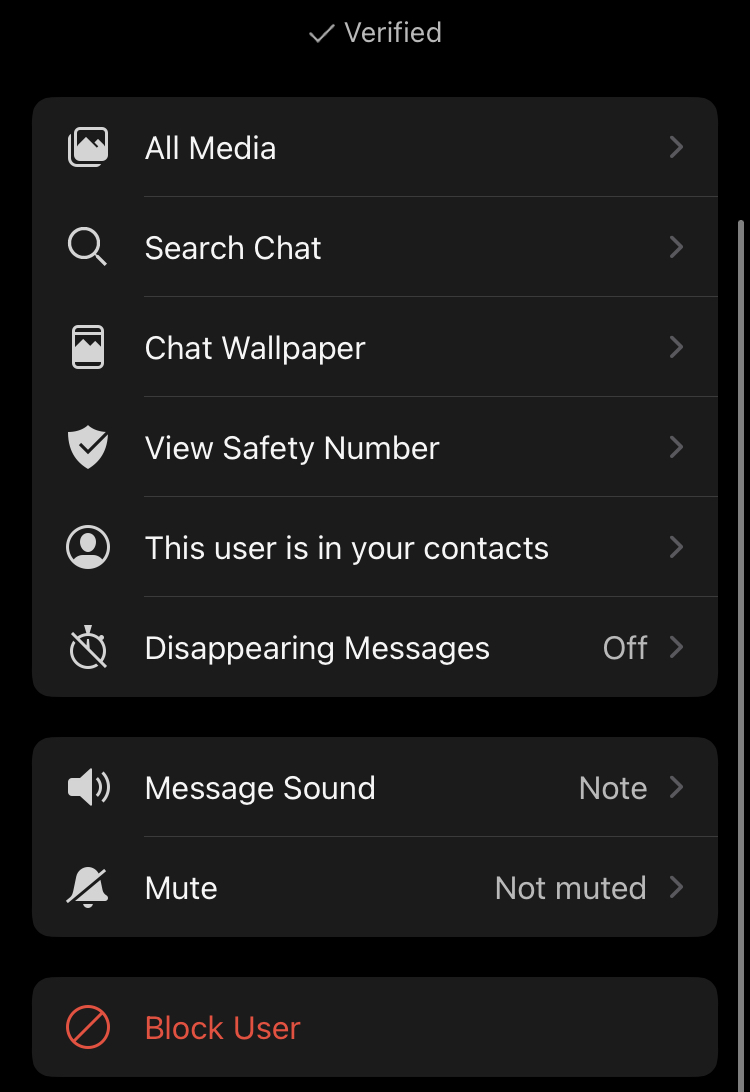
    you even have ombre wallpapers! you can mute and block people just like EVERY  MESSAGING AND SOCIAL MEDIA APP


    you can also verify them and mute them and you can also turn on disappearing messages just like in Snapchat! 
    signal is so much better than WhatsApp. well, that's how I feel. but to be honest, it's all about personal preferences. and there are a lot of videos on youtube about Elon musk promoting signal.. and it's about the changes in privacy on WhatsApp.. well the WhatsApp people say that there are end-to-end encrypted but who knows! I'll leave a link below you guys can check this video out! 

    https:w//youtu.be/c8jxj9GQa3I            the link to the video! 


    you can also choose different "message sounds"... just like shown in the above picture 

    so that's it for this week's blog and I'll see you guys in my next blog. ciao! 

    Popular Posts